

FeaturesmacOS · Windows
Every coding agent in one window
Claude Code, Codex, Gemini, Grok, OpenCode, Cline, Kimi, Pi, Z.ai and more work side by side in one calm app. Pick the agent per chat, switch the model in the middle of a task, and keep using the subscriptions you already pay for.
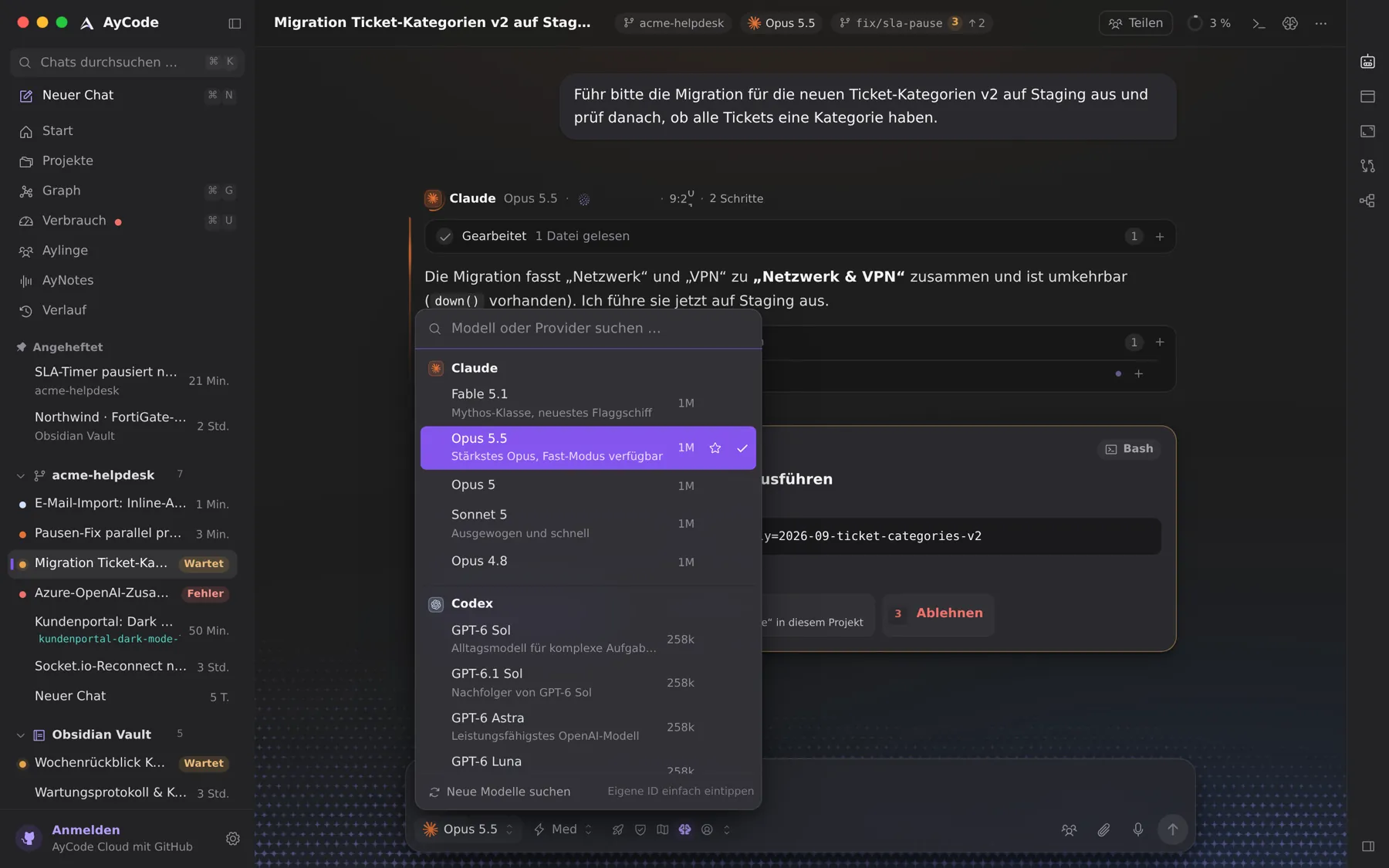
- More than a dozen agents behind one input field
- Your own sign-ins, no API keys required and no tokens resold
- A provider that hangs only blocks its own chat
- New models show up without an AyCode update
One app instead of a terminal per agent
Every coding agent comes with its own command-line tool, its own window and its own habits. AyCode starts their official tools on your computer and gives all of them the same calm surface: one sidebar for every chat, one input field, one way to approve a step, and the same view of what changed.
Each provider runs in its own process. If one goes silent, only its chat waits; the window, the other chats and your typing never freeze. And if an agent returns nothing, the chat says why instead of showing an empty answer.
Which agents work with AyCode
- Claude Code through the Agent SDK, with Fable, Opus, Sonnet and the other Claude models.
- Codex through OpenAI’s app server, and local models from Ollama or LM Studio without any sign-in.
- Antigravity with Google’s Gemini models, Grok from xAI, Kimi Code, Mistral Vibe, ZCode for Z.ai GLM, DeepSeek and Hermes.
- OpenCode, Cline, Pi and Oh My Pi, open agents that reach many models, for example through OpenRouter.
AyCode can find, install, sign in and test these apps for you, after you agree. Several accounts per provider are fine, for example a private one and one for work.
Models, effort and permissions per chat
Click the model name to search across all providers. Next to it you choose how long the model thinks and, for Claude and Codex, how fast it answers. Three modes decide how freely an agent acts: Normal asks before commands and file changes, Plan writes a plan first and changes nothing until you approve it, and YOLO never asks, for throw-away folders and worktrees.
Questions and answers
Do I need API keys to use AyCode?
No. AyCode uses the agent apps the way they are installed and signed in on your computer, so a Claude, ChatGPT or other subscription works as it is. Where an agent takes an API key or a local model instead, that works too.
Is AyCode a Claude Code GUI?
It is that and more: Claude Code runs in AyCode with live steps, diffs, approvals and your notes as context, and so do Codex, Gemini, Grok and the other agents, side by side.
Does AyCode resell tokens or see my code?
No. Your prompts go from your computer to the provider you chose, the same way the agent’s own tool would send them. AyCode resells nothing.
Try it on your own projects.
Free for macOS and Windows. Uses the agents and subscriptions you already have.